

Blog Post
Social Media

Nadine
Wolff
published on:

With these tips, your shop will rise to the e-commerce summit.
Table of Contents
The number of new online stores has grown significantly in recent years, making the competition much fiercer. As a result, e-commerce SEO is becoming increasingly important, as website operators want their products to be easily found and purchased via search engines. These days, it’s not just purely digital brands selling online—many brick-and-mortar businesses are offering their products on the internet as well.
When it comes to search engine optimization for an online store, however, it takes a certain level of expertise to stand out in such a competitive market. E-commerce businesses face different challenges than blogs and other types of websites. In this article, we’ll show you what these challenges are and how you can boost your organic visibility.
The Importance of Internal Linking
A well-thought-out internal linking strategy allows you to guide your visitors directly to the key areas of your site. Web crawlers also navigate their way from link to link. For this reason, you should pay special attention to your internal links.
Web Crawlers Rely on Good Internal Linking
Strategic internal linking plays a vital role in your online store's search engine optimization. It increases the chances that web crawlers will discover your entire product range, along with all the categories that matter to you. Poor internal linking can cause relevant subpages to be overlooked, which in the worst-case scenario means your products won't rank on Google. Make sure that important content isn't buried too deep within your site's architecture, and link to it prominently. This ensures that web crawlers can quickly reach all of your important subpages.
Guiding Visitors Smoothly Through Your Store
Effective internal links also ensure that your customers can navigate your shop quickly and effortlessly to find your top offers. Plus, you can entice visitors to stay on your site longer than they originally planned. On the flip side, poor linking increases the risk of visitors bouncing quickly. This can negatively impact your rankings, as search engines often interpret a short visit as a sign of irrelevant content.
Uncovering Potential and Avoiding Common Mistakes with Products
The main goal of an online store is to sell products. To get your visitors to make a purchase, you need to create a positive search experience. Here are a few key points to keep in mind.
Write Unique and Informative Product Descriptions
To help your products rank as well as possible on Google, you should write informative, detailed, and unique descriptions—for every single product. Add a personal touch that genuinely fits your brand and store. Avoid copying the manufacturer's descriptions word-for-word, as this creates duplicate content. Search engines can tell when content is copied and will lower your site's relevance for the respective search term. By the way, this also happens if you use identical descriptions for multiple items. You also run the risk of legal warnings, as not all manufacturers permit their descriptions to be used freely. So, take the time to write an informative, unique description for each product. Ideally, include reviews from satisfied customers; alongside the description, these help make the buying decision much easier. Both your customers and search engines will thank you for it.
Placing the Same Products in Multiple Categories
In online stores, it's often unavoidable that certain products fit into more than one category. However, some store owners find it tempting to create more categories than necessary just to rank for as many search terms as possible. Since empty categories rarely rank well (if at all), they end up adding products that already appear in other categories and might have little to do with the new one. A word of caution here: if visitors keep bumping into the same products across different categories, it can become confusing and create a frustrating user experience. In the worst case, they might leave your site without buying anything. Web crawlers will also view your site as less relevant if too many products are placed in mismatched categories.
What to Do When a Product Is Out of Stock
Sometimes product pages become unavailable in an online shop. This can happen for several reasons: items sell out, or they are removed from the site for other reasons. So, what should you do with that product detail page? Depending on the situation, you have a few options:
Delete the URL and content. This option makes sense if the product has been permanently discontinued and you ensure no 404 error is generated. However, without a dedicated tool, it's hard to know whether any external sites are linking to the product. Checking for internal links pointing to it can also be quite tedious.
If you're permanently removing a product from your inventory, it's usually better to set up a 301 redirect. This can point to a similar new product, a relevant category, or your internal search page.
If a product is only temporarily unavailable, we recommend keeping the product page live. In this case, you can offer visitors the option to check out a similar product via text, an image, or a link. You can easily place these recommendations right below the product description.
How to Optimize Your Product Images
Product images are essential for any online store. On the one hand, hardly anyone will buy a product without seeing it first; on the other hand, well-optimized images help your products show up in search engine image results. At the same time, high-quality, custom images give your product detail pages a unique, professional look.
Keep Image File Sizes in Mind
To improve your page load times and boost your image rankings, you should always compress your images. This also does wonders for the user experience, since visitors won't wait around forever for a large image to load.
Make the Most of Your File Names
To signal to Google and other search engines which keywords your images are relevant for, be sure to include those keywords in the file name. Ideally, keep file names short and descriptive, and use a unique name for every image. For products, always include the product name. If you're using multiple keywords in the file name, we recommend using hyphens instead of underscores.
Use Title Tags and Image Alt Tags
Both the Image Alt tag and the Title tag can positively influence the ranking of your images and even your website as a whole. Both should provide unique descriptions for each image and shouldn't just be identical copies of each other. The Title tag is primarily helpful for web crawlers, as it gives them a clearer picture of what the image shows.
The Image Alt tag is displayed whenever an image fails to load for some reason—for instance, due to slow loading times or a weak internet connection. It lets your visitors know what should have been displayed there. Visually impaired users also benefit greatly from well-crafted Alt tags, as screen readers read them aloud.
The Risks of Relying on Default Metadata
Many store owners take the easy route and use the default metadata automatically generated by their content management system. However, this often leads to duplicate page titles and meta descriptions. Keep in mind that your meta description and page title are your prime opportunity to grab a potential visitor's attention on search engine results pages and encourage them to click through. Search engines also appreciate it when you provide custom metadata, as it shows you're working hard to create unique, engaging content for your audience. That extra bit of helpful information can really boost your click-through rates.
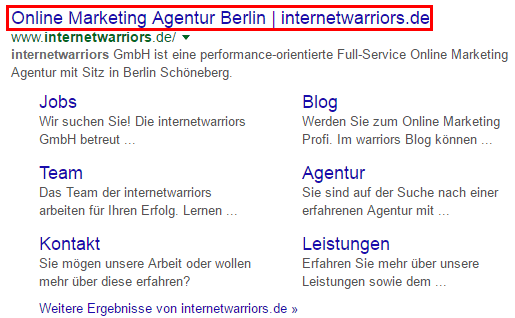
Figure 1: Page title internetwarriors GmbH
How Paginated Pages Affect the Index
If you have too many products in a category to display on a single page, you'll need multiple pages. These pages need to be numbered, a process known as pagination. Even though paginated pages within a category technically feature different products, they often run into duplicate content issues because the surrounding template content is identical across all pages. To prevent this, you can either exclude paginated pages from indexing using a "noindex" tag, or make sure each paginated page features its own unique content.

Figure 2: Pagination internetwarriors Blog
How We Can Help
By keeping these tips in mind, you'll set your online store up for success: your products will be easier to find on search engines, visitors will find their way around effortlessly, and they'll be much more likely to make a purchase and return again. Plus, you'll create a seamless shopping experience that keeps customers coming back. Looking for professional support with your on-page optimization? Feel free to get in touch with us.
Nadine
Wolff
As a long-time expert in SEO (and web analytics), Nadine Wolff has been working with internetwarriors since 2015. She leads the SEO & Web Analytics team and is passionate about all the (sometimes quirky) innovations from Google and the other major search engines. In the SEO field, Nadine has published articles in Website Boosting and looks forward to professional workshops and sustainable organic exchanges.
