

Blog Post
Growth Marketing

Nadine
Wolff
published on:

How to avoid having your emails marked as spam
Table of Contents
Most emails are spam. Modern spam filter systems detect these spam emails and filter them out, so the recipient never actually sees them. However, many legitimate and wanted emails are mistakenly classified as spam as well. This is frustrating for both you as the sender and for your recipients. Here, you'll learn how to make sure your emails reliably land in your subscribers' inboxes.
How Spam Emails Are Assessed
Spam emails are considered impersonal, largely identical bulk messages that are sent without the recipient's prior consent or contain content that is irrelevant to them.
Basically, a distinction is made between two types of spam: criminally motivated messages and unwanted marketing emails. The first group includes backscatter (automated bounce emails sent from forged sender addresses) and phishing emails (fraudulent emails sent to steal sensitive data such as customer logins, bank details, etc.). Unwanted marketing emails, on the other hand, include Unsolicited Commercial Emails (UCE) and Unsolicited Bulk Emails (UBE).
Whether a message is considered spam is decided not only by the spam filter, but also by the recipient. The assessment of whether emails are viewed as spam largely depends on the recipient's interest. The decisive factor is whether the recipient perceives it as a nuisance. An exception to this, of course, are backscatter and phishing emails, which are inherently considered spam by their very nature.
However, if a subscriber receives too many emails in a row and/or the content is irrelevant to them, even emails for which the recipient has explicitly given sending permission can be perceived as spam. These types of emails are also known as "bacn" or "graymail." Bacn refers to emails that are generally desired by the recipient, just not at the specific time they receive them. Graymail, on the other hand, refers to messages that are no longer relevant to the recipient despite prior consent. Spam filters usually let these emails through, but in both cases, you run the risk of your subscribers unsubscribing from your email list.
How Spam Filters Work
The sheer volume of unwanted emails makes the use of spam filters essential. To ensure your emails aren't flagged as spam, it helps to have a basic understanding of how spam filters operate.
Spam filters are programs designed to evaluate incoming messages for their relevance and identify potential spam. Today's spam filters are extremely sophisticated. Messages are evaluated using established parameters embedded within a spam scoring system. These parameters include, for example, specific words or phrases in the sender address, subject line, and the email body itself. In addition to analyzing text elements, spam filters also rely on sender reputation. Based on specific criteria (sender, open rate, click-through rate, spam complaints, etc.) and consulting various databases, a reputation score is calculated.
The specific design of this scoring system is customized by each email provider. That means what is flagged as spam by one provider might be classified as a "normal" message by another. Emails identified as spam are then either deleted by the provider or moved to a dedicated folder. In addition, users have the option to set up their own filtering rules using custom spam settings.
Actionable Steps You Can Take
To keep your emails from being classified as spam, there are specific steps you can take.
Get the Recipient's Consent
Even though this should go without saying—if only from a legal standpoint—you should always ensure that you have obtained permission from your intended recipient before sending. Since many companies still believe that email addresses can simply be purchased, this point cannot be emphasized enough.
An effective way to ensure reliable delivery is to have your sender address added to the recipient's address book. Because this rarely happens automatically, especially in the B2C sector, you should kindly ask your subscribers to add your email address to their contacts.
It's best to make this request as early as possible, ideally right in your very first regular newsletter. The reason: since the subscriber has just chosen to sign up, the likelihood of them opening your first few emails is particularly high. To make sure your request is noticed—since the newsletter itself focuses on another topic—you should feature it prominently in the message.
Avoid Shady Words and Phrases
Although spam filters consider various criteria when analyzing emails and text evaluation is just one of many factors, you should still avoid certain words and phrases. These include expressions like "click here," "limited time offer," "act now," "must be 18," and "available today only." You should also avoid using multiple exclamation points (!!!). In general, be cautious with heavy punctuation like question marks and exclamation points. It's also best to steer clear of words or entire sentences written in all caps.
Be Transparent
If you're sending an email featuring the latest online shop deals, make that clear right in the subject line. Few things annoy subscribers more than opening an email under false pretenses only to find content different from what was promised. Not only is it unlikely that they'll click any of your links, but they might also mark your email as spam. In the worst-case scenario, they will unsubscribe from your newsletter altogether.
To encourage recipients to open your emails in the first place, you should naturally use a professional sender address. Avoid dubious-looking addresses like John63@mail71.net. The more spammy a sender address looks, the higher the chance that emails from it will be filtered out. Great examples of professional addresses include editor@name.com, newsletter@name.com, or peter.miller@name.com.
Send via Secure Servers
Spam filters pay close attention to which server your emails are sent from. The easiest way for them to recognize legitimate emails is by checking the sending server's IP address. If it's on a list of registered and certified senders, you've already cleared the first hurdle. That's why it's wise to choose a reputable email service provider for your campaigns, as they are typically listed on major whitelists. Whenever possible, make sure your mail server configurations are properly set up.
Get Listed on a Whitelist
A whitelist is the opposite of a blacklist (a directory of IP addresses considered sources of spam) and can be seen as a mark of certification. Essentially, a whitelist helps reduce the risk of false positives (wanted emails accidentally being classified as spam) in a spam filter system. Any IP address and/or domain that makes it onto such a list is generally delivered straight to the recipient's inbox. Well-known whitelists include The DNS Whitelist and The Spamhaus Whitelist.
Getting successfully whitelisted, however, isn't a free pass to send whatever you want. If you don't follow best practices, you risk being removed from the list again.
In addition to public whitelists, every recipient has the ability to create their own personal whitelist. As an email marketer, you should aim to get onto these personal lists. The best way to do this is simply to
ask your subscribers directly to add you. It takes very little effort on their part.
One great approach is to include a pre-header note like: "Please add this address to your address book or contact list to ensure you reliably receive our newsletter." You can also ask your recipients to check their spam folder (sometimes called the junk folder) and mark your email as "Not Spam" if it ended up there. The email provider will remember this preference and let your future emails through without issue.
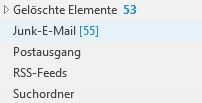
Fig. 1: Encourage your subscribers to check their spam folder for your emails.
Beyond successful deliverability, you'll also benefit from better email rendering. Images will display immediately rather than requiring the user to click "load images." In addition, email providers often disable links if they doubt the message's origin, but if your address is on a (personal) whitelist, your links will remain fully functional and intact.

Fig. 2: Embedded images in emails are often not displayed properly by default.
Avoid Sending Too Frequently
Email is a fantastic way to stay top-of-mind with your target audience, but you should still avoid sending too often. Some spam filters view an unusually high sending frequency as a potential sign of spam. As a result, even as a legitimate sender, you could easily end up in the spam folder.
A good rule of thumb: only send an email to your community when you actually have something valuable to say. Depending on your business, that could be the latest shop deals, a new blog post, or relevant company and industry news. To help subscribers know what to expect, it's ideal to let them know right when they sign up how often they'll hear from you and what kind of content you'll be sharing.
Regularly Clean Your Subscriber List
Even though it might be tough to part with contacts, you should regularly review your mailing list for inactive addresses and remove them manually. Deliverability and open rates are key indicators for spam filters when determining whether an email is unwanted. A small percentage of undeliverable or unopened emails is completely normal.
However, if a large percentage of your messages bounce (because the email address no longer exists) or go unopened, it can reflect poorly on your sender reputation. It's also possible that recipients who haven't opened your emails in a long time might eventually just mark them as spam. If several subscribers with the same email provider do this, that provider might start treating all of your messages as spam moving forward. You definitely want to avoid both scenarios.

Fig. 3: You should manually remove inactive newsletter subscribers from your email list.
Be careful when cleaning up your list. During a list cleanup, it's best to check each subscriber individually and remove them manually. While professional email marketing tools offer automated removal features, it's often wise to review things yourself so you don't accidentally unsubscribe active, engaged readers.
How We Can Help
Are you planning email campaigns or already sending newsletters, but having trouble consistently reaching your recipients' inboxes? Do you need professional support with your email deliverability, or would you like to have your overall campaign strategy audited? Feel free to get in touch with internetwarriors GmbH for expert advice on all things email marketing!
Nadine
Wolff
As a long-time expert in SEO (and web analytics), Nadine Wolff has been working with internetwarriors since 2015. She leads the SEO & Web Analytics team and is passionate about all the (sometimes quirky) innovations from Google and the other major search engines. In the SEO field, Nadine has published articles in Website Boosting and looks forward to professional workshops and sustainable organic exchanges.
Comments on the post
no comments yet
Write a comment
Your email address will not be published. Required fields are marked with *
