


Blog Post
Search Engine Optimization

Nadine
Wolff
published on:

How to speed up your website's load times
Table of Contents
We've all been there: You search for a topic on Google, open a website hoping to find the information you need, and the content and images take forever to load. According to a study by Akamai Technologies, 57% of searchers wait only three seconds or less before leaving a page. The average page load time is around 8 seconds—meaning the time it takes for all scripts, images, and plugins to fully load. It's also no longer a secret that Google factors load times directly into its search algorithm.

Image 1: An overview of load time information. Created with www.pagespeed.com
Make a Big Impact with Small Tweaks to Reduce Load Times
Here are a few handy tips that can make a huge difference in your site's performance:
Use the caching feature: Pages that rarely or never change can be temporarily stored by the visitor's browser—a process known as caching. Almost all CMS platforms, like WordPress and TYPO3, include this feature in their page settings, allowing you to cache specifically selected pages. If not, you can configure these settings manually in the .htaccess file. Stylesheets: Try to link as few external CSS files as possible. It's best to keep all the code in a single stylesheet. This also speeds up load times, as caching plays a big role here once again. As a general rule, stylesheets should be placed in the website's header. It's also a good idea to regularly check for and remove any CSS snippets or entire files that are no longer needed. Defining styles directly via inline styles creates unnecessary data overhead. The cherry on top for site optimization is removing superfluous spaces and comments through "minification" (minimizing characters).Example Adiv.menu {
background: black;
height: 15px;
width:240px;
}
Example B
div.menu {background: #000; height: 15px; width:240px;}The difference between Example A and Example B is that all spaces have been removed. Line breaks are also treated as special characters and have been eliminated as well. The background attribute was condensed using a hex code. In general, valid W3C source code, properly nested HTML elements, and clean, streamlined markup should be your primary optimization goals. JS, HTML, and other plugins: Scripts such as JavaScript or plugins belong in the website's footer unless they are strictly required right at the start of the HTML code. You should also avoid embedding entire libraries if possible, though this can sometimes be tricky when new code snippets need to be added later.
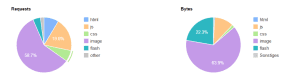
Image 2: Shows the "content breakdown" and lists all files by percentage.
Handling images and videos: Due to their file size, graphics and images represent a major data load and can dramatically increase loading times. Many popular graphic design programs offer dedicated, optimized save options for web use. Whenever possible, use *.JPEG files, as they offer the highest level of compression. Make sure assets aren't frequently being pulled from external sites, and avoid resizing images via source code at all costs. Tip! With the jQuery Lazy Load plugin, you can delay image loading until they actually enter the viewport when scrolling. WordPress offers an easy-to-install, simple-to-configure LazyLoad plugin. Resizing images via HTML/CSS forces the visitor's computer to do the heavy lifting, which won't make the page load any faster. The same principle applies to videos. There are already many tools available that embed videos, like YouTube, directly onto the site, though their integration leaves little room for direct optimization. Additional tools in CMS platforms: If your website runs on a Content Management System (CMS), be thoughtful about the number of plugins or extensions you install. Often, plugins bundle features that you could easily write into your template yourself. Even the smallest module adds to load times and memory usage as the page builds. Keep your list of active plugins clean and tidy.
Other Potential Causes of Slow Load Times
Strictly speaking, the following factors can also be responsible for a sluggish website:
Where is your web server located?: Are you using an inexpensive, sluggish shared hosting package with a large provider? Or does your website run on a dedicated server? The best solution is a fast, high-performance server, where technical server optimization (technical SEO) can significantly cut down load times. Browser architecture: Browsers are a key factor in how your site performs. Different browsers rely on different rendering engines, each with its own strengths and weaknesses, meaning rendering times will naturally vary. You can learn more about the specific pros and cons of major browsers in the next article of our series.
How We Can Help
Looking to boost your website's performance and lower your bounce rate? We'd love to help you optimize your files, stylesheets, and Content Management System to get your site loading at top speed.
Nadine
Wolff
As a long-time expert in SEO (and web analytics), Nadine Wolff has been working with internetwarriors since 2015. She leads the SEO & Web Analytics team and is passionate about all the (sometimes quirky) innovations from Google and the other major search engines. In the SEO field, Nadine has published articles in Website Boosting and looks forward to professional workshops and sustainable organic exchanges.
