


Blog Post
Search Engine Optimization

Nadine
Wolff
published on:

What is Duplicate Content?
Table of Contents
Duplicate content (or "DC") refers to the issue where identical or substantially similar content can be accessed via multiple URLs or across multiple pages on the internet. This could involve copied snippets of text or entire duplicate pages. In turn, pages containing duplicate content often rank lower in search results, since most search engines perform duplicate content checks and are very good at spotting—and even filtering out—repeated material.
To help your website secure the best possible ranking, every indexed page should feature "unique content." Running duplicate content checks and steering clear of repeated material are core pillars of search engine optimization (SEO).
The difference between internal and external duplicate content
In SEO, we distinguish between internal and external duplicate content. Below, we'll walk you through a few common examples of how it can happen.
Internal duplicate content occurs when identical content is accessible across multiple URLs within the same domain. This often happens because of content management systems (CMS) or URL parameters that automatically structure and generate pages, such as:
Pages accessible with "http" or "https", with or without "www"
Internal search result pages
Tag overview pages
Filter overview pages
Category pages
External duplicate content refers to identical content available across multiple URLs on different domains. Common examples include:
Content theft
Content scraping
Press release distribution
Domain migrations
Looking to move from an old domain to a new one while bringing your content along? That last point—domain migration—can easily be resolved using a simple 301 redirect.
How do I spot duplicate content? – The duplicate content check
The simplest way to spot DC is to enter text snippets directly into a search engine. However, there's an even easier route: using tools like Google Search Console. In the free Search Console, the "Index Coverage" report lists pages that Google has classified as duplicates.
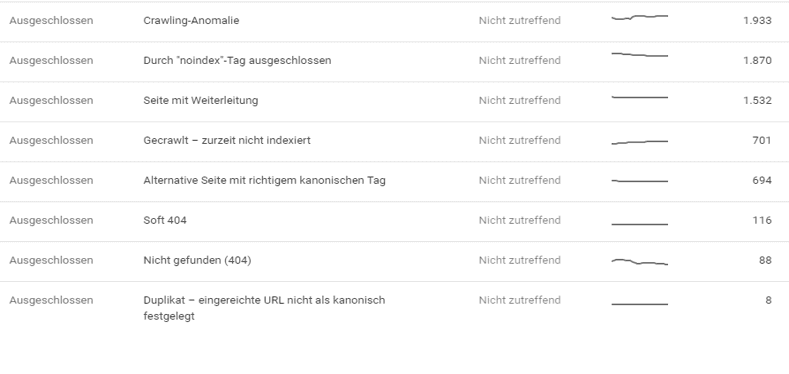
Fig. 1 Index Coverage - Identifying duplicates in Google Search Console
By clicking on "Duplicate without user-selected canonical," you'll get an overview of all URLs flagged as duplicate content (Fig. 2). This allows you to specifically review and optimize any pages affected by duplicated text.

Fig. 2 URLs of duplicates in Google Search Console
How do search engines identify duplicate content?
Search engines like Google identify and filter out duplicate content during scheduling, indexing, and within search results across the crawling and indexing process.
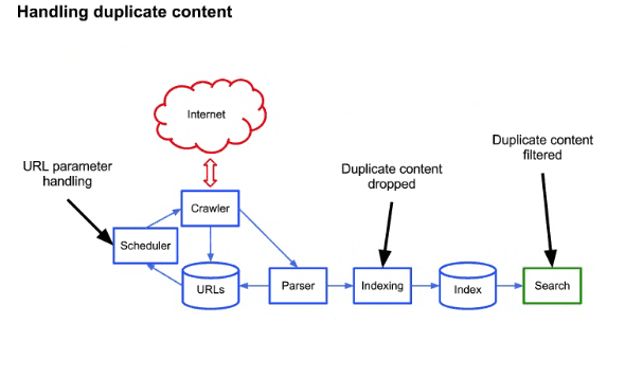
Fig. 3 Duplicate content in the crawling process
Duplicate content - URL parameters
By design, a URL is intended to be a unique address for a resource on a server. Distinct URLs that include parameters but serve the exact same content are a classic example of duplicate content.
The rel="canonical" solution
Using a canonical tag, URLs with parameters can point back to a primary or overview page. Most content management systems offer plugins that automatically set the rel="canonical" tag, which search engines can easily read.
The "noindex" solution
Another approach you can implement using CMS plugins is adding a meta robots tag set to "noindex" within the page's <head>. The "noindex" directive tells the search engine not to include that specific URL or page in its index.
Keep in mind that according to Google guidelines (John Mueller), these two solutions should not be combined!
Search engines filter duplicate content
If duplicate content on your site has made its way into a search engine's index, Google may filter it out. Filtering duplicate content means the search engine systematically ignores or hides the affected pages. This reduces the total amount of readable content on your site and can hurt your relevance and rankings in search results. In SEO, a word count of at least 400–800 words is typically recommended—and often more, depending on your competition. So don't let duplicate content hold back your rankings and visibility!
Tips to avoid duplicates
Here are a few handy tips to help you prevent duplicate content:
Use a unique URL for each piece of content
Avoid URL variations
Keep pages focused on a clear topic
Use contextually relevant internal links
Avoid repeating boilerplate text blocks
Use tools like Google Search Console
Consolidate highly similar content under a single URL
Linking to relevant, topic-aligned pages within your own domain even strengthens your internal link structure. Strategic internal linking helps create topic clusters that search engines can easily recognize and reflect in search results. You can also check out the Google Guidelines for more tips and guidance on avoiding duplicate content.
Creating unique content
In editorial SEO, creating unique content that genuinely satisfies user search intent is top priority. Make sure visitors find relevant, one-of-a-kind content that encourages them to stay on your site. That said, many businesses simply don't have the in-house bandwidth for ongoing content marketing.
Content marketing and content optimization are core specialties here at internetwarriors. If you'd like a hand creating SEO-optimized content, feel free to contact us for free!
Nadine
Wolff
As a long-time expert in SEO (and web analytics), Nadine Wolff has been working with internetwarriors since 2015. She leads the SEO & Web Analytics team and is passionate about all the (sometimes quirky) innovations from Google and the other major search engines. In the SEO field, Nadine has published articles in Website Boosting and looks forward to professional workshops and sustainable organic exchanges.
