

Blog Post
Web analytics

Nadine
Wolff
published on:

No Google Analytics without a Google Analytics Opt-Out Cookie
Table of Contents
If you use Google Analytics for web analysis, you should make sure that it's being used in compliance with data privacy regulations. To do this, you need to meet and follow these guidelines (not legally binding):
Data processing agreement with Google
Deletion of legacy data
Privacy policy detailing the use of Google Analytics
Anonymization of IP addresses when collecting user data
Integration of an opt-out solution
You can find a detailed list of the points mentioned above on the website Datenschutzbeauftragter-Info. There, you'll also find a template for the data processing agreement that needs to be concluded with Google.
However, adding an opt-out solution is often forgotten. By installing a Google Analytics add-on or an opt-out cookie, users get the option to prevent their data from being collected. Offering this is mandatory in EU countries, and failing to comply can lead to costly consequences.
Following the introduction of the new General Data Protection Regulation (GDPR) on May 25, 2018, it has become even clearer that these adjustments need to be taken seriously. The link to deactivate Google Analytics must be included on every page that uses Google Analytics as a tracking tool.
In this article, we'll show you how to properly create and implement the opt-out notice.
Note on Using Web Analytics and Data Privacy
When using web analytics, it is essential to regularly check and keep your website's data privacy up to date.
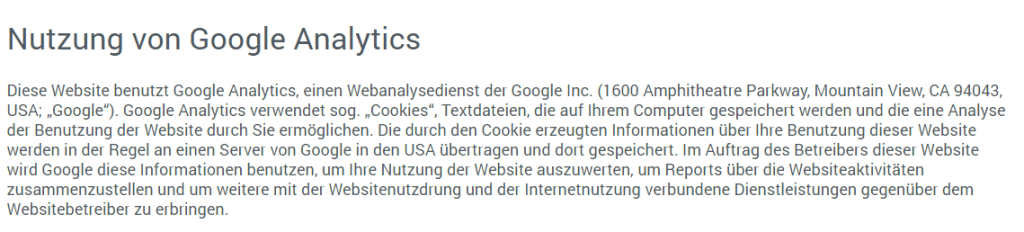
Figure 1: Excerpt from the privacy policy page of internetwarriors GmbH (I)
In addition to just providing written explanations, you are required to implement an opt-out option. There are several ways to deactivate the Google Analytics tracking code:
Installing the Google Analytics Add-on, which prevents Analytics from collecting data across all popular browsers. The add-on works independently of the websites visited and generally prevents Google Analytics from collecting any data.
Setting a so-called opt-out cookie.
To use Google Analytics in full data compliance, both options should be implemented.
If the user decides to use the opt-out cookie, it only applies to the registered UA number of the Google Analytics property defined in the cookie.
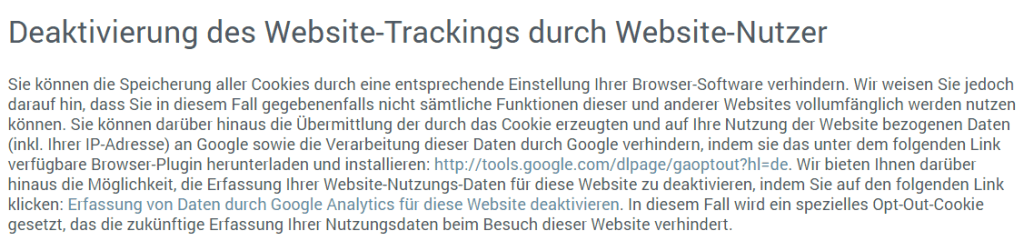
Figure 2: Excerpt from the privacy policy page of internetwarriors GmbH (II)
Deactivating Google Analytics with the Opt-Out Cookie
To implement the opt-out cookie, you first need to write a JavaScript snippet and embed it into your pages. Through a link on your privacy policy page, the user can then trigger the script and deactivate Google Analytics. You should place the JavaScript in your source code before the closing tag. It is crucial that the script is placed before the actual Google Analytics code so that the activated script can take effect before any data is collected. If you use Google Tag Manager , you also need to make sure the cookie script is loaded before Google Tag Manager.
The script for the opt-out cookie looks like this:
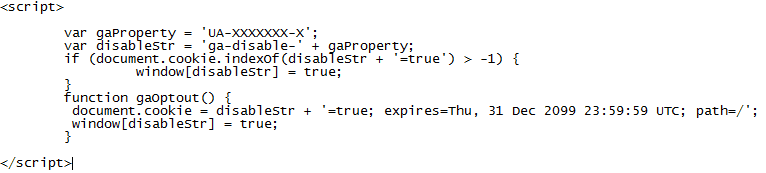
Figure 3: The script for the opt-out cookie
The string 'UA-XXXXXXX-X' in the first line must be replaced with your own Google Analytics property. The next four lines up to window[disableStr] = true;} handle the deactivation of the Analytics cookie. The command function gaOptout() sets the opt-out cookie as soon as the corresponding link on the privacy policy page is embedded and clicked. In our example, the set opt-out cookie remains valid until December 31, 2099, at 11:59:59 PM, unless it is cleared by the user beforehand. Once you have created the above script and added it to the head section of your pages, the second step is to add an HTML link to your privacy policy page so that the command "function gaOptout()" can be executed.
The link can look like this:
<a href="javascript:gaOptout();" onclick="alert('Google Analytics has been deactivated');">Deactivate data collection by Google Analytics for this website</a>
With the snippet onclick="alert('Google Analytics has been deactivated'), a small pop-up window will inform the user after clicking that Google Analytics is now deactivated.
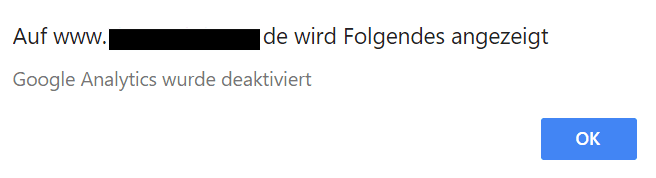
Figure 4: An "alert" opens an additional pop-up window
If you, as a website operator, want to ensure that the cookie is being set, we recommend first clearing all cookies in your browser settings. Then, visit your privacy policy page and click the link to deactivate Google Analytics. The info window should pop up first. In the next step, you can verify whether the opt-out cookie (ga-disable-UA-XXXXXX-X) has been set:

Figure 5: Checking if the opt-out cookie was set (view from Google Chrome; UA number is anonymized)
An alternative way to check if the Google Analytics opt-out cookie is working is to use the browser plugin EditThisCookie.
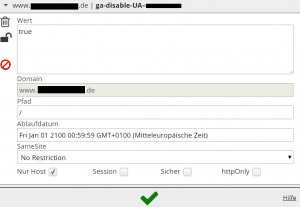
Figure 6: Checking if the opt-out cookie was set – with the add-on "EditThisCookie"
Note: If the user has disabled JavaScript, the cookie won't trigger, but Google Analytics won't receive any data anyway, since Analytics is also integrated via JavaScript.
If you add the Google Analytics opt-out link using the WordPress Visual Composer on your privacy policy page, please note that the Visual Composer builder system may overwrite the JavaScript snippet, preventing the opt-out cookie from being set. The solution here is to embed the script directly in the page's HTML mode.
The Additional Cookie Banner
Many websites currently feature an additional cookie notice. This alerts visitors that the site uses cookies to improve usability. Users also have the option to confirm this by clicking the OK button or to be redirected to the privacy policy page.

Figure 7: Cookie notice on websites
You can find a great, free tool for easily implementing a cookie notice on the Cookie Consent website.
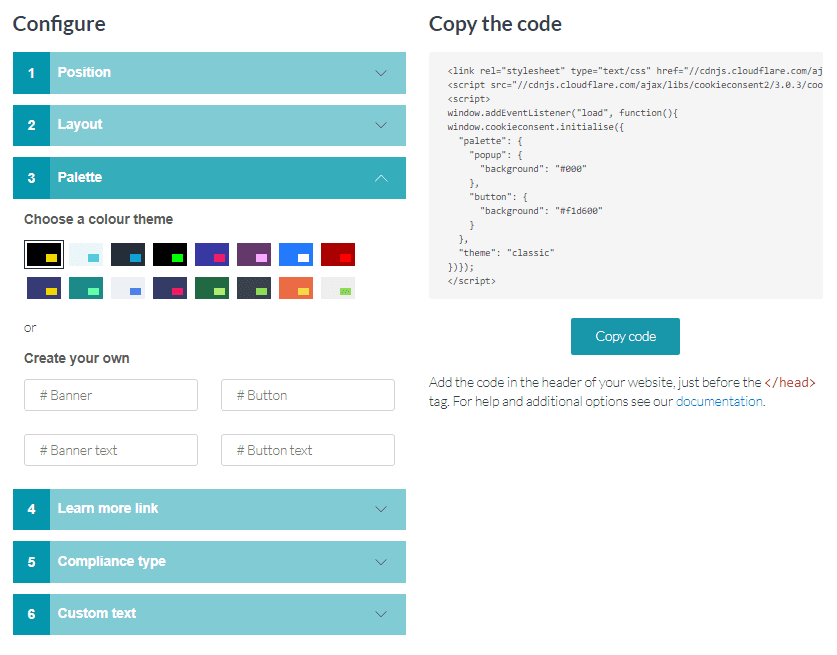
Figure 8: Use the Cookie Consent tool to build a cookie notice for your site
The tool provides a user-friendly interface to create a cookie notice snippet. You can choose between different positions, layouts, and colors. You can also specify the link for more details—namely your privacy policy page—directly in the tool.
Under "Compliance type," you can choose whether the banner should simply display a notice on your website, or if you want to set an opt-out cookie directly within the banner; an opt-in cookie is also an option. However, basic JavaScript knowledge is required here to properly embed the scripts on your website or within Google Tag Manager.
On the right-hand side, you'll find the code to be embedded in the page header. Please remember that the code should be implemented before the closing tag in your site's source code.
You can read up on the legal basis for this on the website www.e-recht24.de.
There are also ongoing discussions about making an opt-in solution mandatory for data collection instead of an opt-out notice. However, exact details are not yet known, so implementing the opt-out cookie and/or providing the link to the Google Analytics add-on should keep you on the safe side for now.
The upcoming ePrivacy Regulation is expected to lay the groundwork for a fully mandatory opt-in solution. There is currently no confirmed date for when ePrivacy will come into effect alongside the GDPR. For more information and the latest updates, we recommend checking the website of the German Association for the Digital Economy (BVDW) e.V.
What We Can Do for You
Changes in data protection guidelines can happen quickly. When they do, you need to respond fast before it gets expensive. We are happy to help you implement online marketing measures on your website, always doing our best (without legal liability) to ensure compliance with privacy regulations across web analytics, Google Ads, and social media. If you have any questions, we're here to help. We look forward to hearing from you via our contact form.
Nadine
Wolff
As a long-time expert in SEO (and web analytics), Nadine Wolff has been working with internetwarriors since 2015. She leads the SEO & Web Analytics team and is passionate about all the (sometimes quirky) innovations from Google and the other major search engines. In the SEO field, Nadine has published articles in Website Boosting and looks forward to professional workshops and sustainable organic exchanges.
Comments on the post
no comments yet
Write a comment
Your email address will not be published. Required fields are marked with *
