

Blog Post
Web analytics

Nadine
Wolff
published on:

Phone Tracking - How Can You Track Your Customers' Calls?
Table of Contents
The synergies between online and offline channels have been engaging the online marketing community for quite some time now. Today, there are increasingly more ways to bridge the gap between these different disciplines—such as through call tracking. It is now possible to accurately attribute phone calls generated by sources like AdWords ads, adding significant extra value to your campaigns.
Before getting started, campaign goals should be clearly defined. What actions do you want users to take? Should they purchase a product, sign up for your newsletter, or download a white paper? These are the most commonly tracked conversions. However, users who reach out by phone might also be just as valuable for your business. With AdWords Conversion Tracking, you can easily track phone calls coming directly from your text ads or your website.
In this article, we’ll introduce you to the different call tracking options available.
What types of call conversions are there?
Whether you run a brick-and-mortar store, an online shop, or an informational website: as soon as you run ads for your business via AdWords, the success of every click on your ads should be measured. Did the user buy a product after clicking your ad, did they stay on your site for more than a minute, or did they call to get advice? Even if you don't take bookings over the phone, customers who reach out by phone are still important, as this touchpoint can easily lead to a conversion down the road.
Getting in touch via the number in your text ad
With an AdWords text ad, you provide users with relevant information about your company. You use the two headlines and description to showcase your products and/or services in the best possible light, and invite the user to interact with your site using a call-to-action.
Using ad extensions, you can add even more useful information to your text ad. One of these options is the call extension.
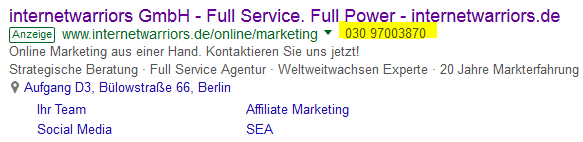
Fig. 1: Fig. 1: Text ad with call extension
You can set up conversion tracking so that a conversion is recorded in AdWords whenever a user calls this number. You can also apply filters to exclude short or irrelevant calls, for example.
To successfully set up call tracking via call extensions, the following requirements must be met:
Use of a Google forwarding phone number
Enabling the option "Count calls as call conversions"
This tracking is also possible if you use a "Call-only ad":
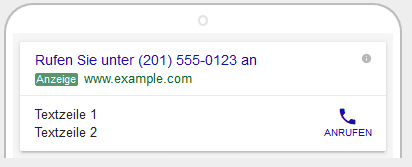
Fig. 2: Call-only ad/p>
Please note that this feature is not supported in all countries.
Getting in touch via the number on your website
In this scenario, the user clicked on your ad and landed on your destination page. On this page, you display your phone number so users can give you a call if they have any questions.
Fig. 3: Phone number on website/p>
Fig. 3: Phone number on website
These calls can also be tracked and counted as conversions in AdWords.
To successfully set up call tracking through your website, the following requirements must be met:
Use of a call extension
Use of a Google forwarding phone number
Integration of a conversion tracking code and a JavaScript snippet so that your phone number can be replaced with a Google forwarding number
Getting in touch via the number on your mobile website
In this case, you can only track clicks on your phone number, not the actual calls themselves.
Requirements:
Use of a Google forwarding phone number
Integration of a conversion tracking code on your site
Integration of a JavaScript snippet with an onclick event handler
Importing data from CRM systems into AdWords
With this method, you can track only those calls as conversions that actually resulted in a purchase. You can also include the sales values directly in the tracking.
How does it work?
- Create a conversion action for customer calls made through your ads or your website (after a user has clicked on your ad)
- Record call details (phone number, time, call duration, purchase, etc.) in your CRM
- Upload the data file to AdWords
- AdWords syncs the call details back into the CRM
- Evaluate the performance of your campaigns, ad groups, and keywords
To import call conversions, the following requirement must be met:
Use of a Google forwarding phone number.
With call conversion tracking, you can clearly see which keywords generate calls and optimize your campaigns accordingly.
How can we help?
Need assistance setting up call conversion tracking? Have questions about AdWords in general? Our team of experts will be happy to help—feel free to get in touch with us.
Nadine
Wolff
As a long-time expert in SEO (and web analytics), Nadine Wolff has been working with internetwarriors since 2015. She leads the SEO & Web Analytics team and is passionate about all the (sometimes quirky) innovations from Google and the other major search engines. In the SEO field, Nadine has published articles in Website Boosting and looks forward to professional workshops and sustainable organic exchanges.
