

Blog Post
Search Engine Optimization

Nadine
Wolff
published on:
Reviewing the website with Chrome browser tools
Table of Contents
Many work processes can be managed much better using browser tools in Google Chrome, helping you achieve SEO success more efficiently.
Google Chrome isn't the only browser with helpful plugins. Browsers like Mozilla Firefox, Internet Explorer, and Safari also offer add-ons, extensions, and plugins that make it easy to analyze your website.
This article focuses on extensions for the Google Chrome web browser. At internetwarriors, we work every day with the three extensions featured in this article. When it comes to manual SEO tasks, these tools can help cut down on recurring chores and significantly speed up your workflow.
The featured browser tools spot technical errors in your website's structure, check links, analyze content, and flag display issues.
MozBar - The All-In-One SEO Toolbar
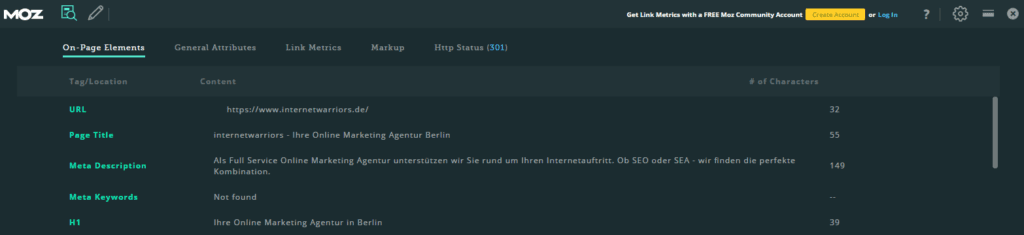
Figure 1: MozBar Interface
Developed by Moz, MozBar is an indispensable Chrome extension for routine SEO work on your website. The free version of this SEO tool lets you perform the following analyses:
• MozBar instantly displays the most relevant metrics while viewing any page.
• Finds and highlights keywords on a page and differentiates links by type: Followed, No-Followed, External, or Internal.
• Creates an overview of page elements: general attributes, markup, and HTTP status.
• Displays redirects and redirect chains.
The tool also offers an upgrade option with a 30-day free trial that is definitely worth checking out. Here are some of the MozBar Premium features available:
• Page Optimization - searches for top-performing content to build winning strategies
• Provides detailed on-page optimization advice and content suggestions for every keyword on any page.
• More Metrics - analyzes pages in greater depth, such as root domain and subdomain links, etc.
• The keyword ranking tool keeps you up to date on any ranking fluctuations, giving you a quick overview of the competitive landscape.
• Tracks geo-targeted keyword rankings at national, city, and neighborhood levels.
• Crawls your site, complete with crawl diagnostics
It's definitely worth taking full advantage of the free 30-day trial for your website projects.
User-Agent Switcher - Visualizing Different Devices
The User-Agent Switcher extension lets you view a website across various web browsers and devices. This extension comes in handy for website troubleshooting and uncovering SEO issues that aren't visible during standard desktop work.
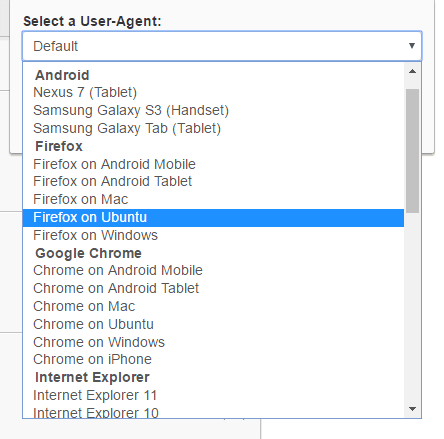
Figure 2: Device selection in User-Agent Switcher
For instance, if you need to take a screenshot of an SEO issue that only appears on mobile devices, this tool is ideal for previewing different page views. The extension allows you to switch between mobile user agents and desktop views. Combined with a screenshot tool, you can capture full-screen images for analysis or documentation purposes.
Wappalyzer - Detailed Insight into Technical Stacks
Wappalyzer is a browser tool that uncovers the technologies used on websites, often including version numbers and other specific details. It detects content management systems, eCommerce platforms, web servers, JavaScript frameworks, analytics tools, and much more.
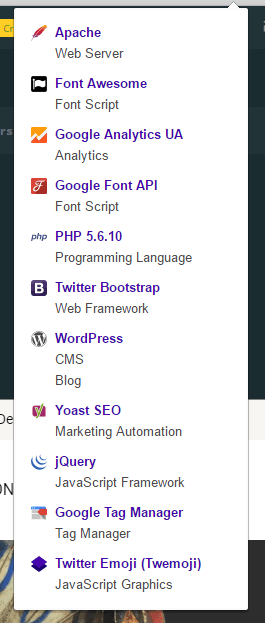
Figure 3: Wappalyzer Interface
This tool lets you conduct initial technical analyses even without in-depth knowledge of the entire system.
Conclusion
Using these browser tools can significantly boost your SEO efficiency. Getting used to new browser extensions always takes a bit of time and effort. However, once you've mastered them and made them part of your daily routine, your SEO success will grow exponentially.
Nadine
Wolff
As a long-time expert in SEO (and web analytics), Nadine Wolff has been working with internetwarriors since 2015. She leads the SEO & Web Analytics team and is passionate about all the (sometimes quirky) innovations from Google and the other major search engines. In the SEO field, Nadine has published articles in Website Boosting and looks forward to professional workshops and sustainable organic exchanges.
