

Blog Post
Search Engine Optimization

Thorsten
Abrahamczik
published on:

Record entries of domain management and what you need to consider when making adjustments
Table of Contents
As a website owner, managing your domain is an essential part of the job. This isn't just about buying a domain—it also involves configuring settings for web and email servers. This primarily affects larger companies or agencies that manage domains on separate servers distinct from their actual web or email servers.
Examples of this include providers like NICdirekt or 1Blu, where domains are purchased and managed, and which specialize in enterprise hosting. However, standard web hosting providers like Mittwald, Webgo, Host Europe, and others also offer domain configuration options to some extent.
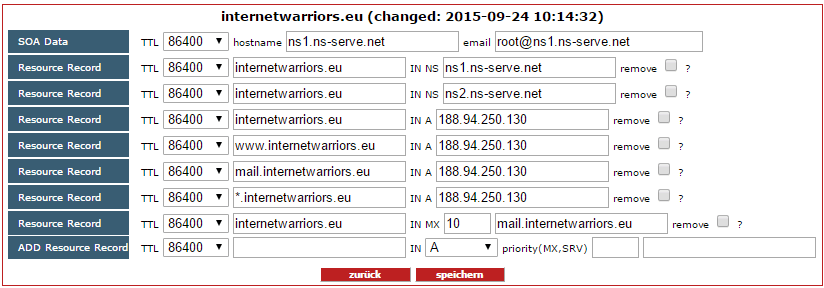
Fig. 1: DNS records for a domain belonging to internetwarriors GmbH
Configuring the Domain Name System
The Domain Name System, often abbreviated as DNS, is one of the most critical services on the internet. DNS servers are responsible for translating URL names into IP addresses.
When you type a URL into your browser, internet servers initially can't do much with it because they rely on IP addresses for identification. An IP address is a unique sequence of numbers assigned to every device connected to the internet. The easiest way to picture this is like a phone number assigned to a specific telephone line.
To help the browser find out which server hosts the requested website (the URL typed into the browser), it first sends a request to a DNS server. This server maintains a vast database mapping each domain to the IP address of its corresponding server—much like a phone book lists phone numbers for each name.
In response to the query, the DNS server returns the web server's IP address to the browser. The browser can then send the website request directly to the actual web server.
Types of DNS Records
For the DNS server to know which IP address belongs to a URL, this needs to be configured in the domain settings. Several types of "records" handle different services. Here are the most important ones:
NS
A
AAAA
MX
Name Server Record – NS
The Name Server record, commonly referred to as NS, handles name resolution. It translates service names (like domains) into machine-readable addresses known as IP addresses.
Each of these entries has a TTL (Time to Live). This setting determines how long an entry remains valid in the cache before it is refreshed. Typically, this value is set to 86,400 seconds, which equals 24 hours.
Consequently, moving a domain to a new web server takes about 24 hours, as DNS servers worldwide need to update before browsers receive the correct new IP address.
Address Record – A
The Address record, or A Resource Record, ensures that an entry on a DNS server is mapped to an IPv4 address. IPv4 addresses are based on a four-octet system. This format has a very limited pool of available IP addresses and can no longer cover the demand for all internet-connected devices, such as computers, smartphones, and servers. Despite this, it remains widely used today.
Address Record – AAAA
The AAAA Address record serves essentially the same purpose as the A record. However, it operates on the IPv6 address system, which is the successor to IPv4. It provides a vastly larger pool of IP addresses, easily accommodating a much higher volume of devices and DNS records.
Mail eXchange Record – MX
An MX Resource Record specifies which domain handles mail for your server. Email clients rely on this record to send and receive messages. Keep in mind that this entry must always contain a fully qualified domain name.
How Can We Help You?
With our years of experience in web hosting and domain management, we would love to advise you on supporting and maintaining your website. Feel free to get in touch with us if you'd rather not deal with the technical side of your site or if you're planning a relaunch. We'd be delighted to discuss a tailored solution with you!
