


Blog Post
Search Engine Optimization

Nadine
Wolff
published on:
Use the hreflang tag to display the correct language version and avoid duplicate content
Table of Contents
The hreflang tag is an attribute that informs Google and other search engines about different language versions of a website. This ensures that users are served the exact content that is relevant to them. In addition, the tag plays a crucial role in preventing duplicate content. If you have a website in multiple languages, your content may be similar, and without the hreflang tag, duplicate content can arise—which can negatively impact your site's performance. That is why it’s important to implement this attribute correctly.
What options are there for using language markup?
In our example, you can see the English-language website https://www.beispiel.com. The German-language version of the site can be found at https://de.beispiel.com. You have three ways to show Google that the German URL is the German-language version of the English website:
Sitemap: You can submit information about different languages in your sitemap instead of using the markups listed below (additional markup in the source code that is only relevant for search engines).
HTML link element in the header: Here, you should add a link element in the head section of your source code that points to another language version.

Fig. 1: Link element pointing to the German version of an English website
HTTP header: With the HTTP header, you can also indicate different language variants for files that are not published in HTML format.

Fig. 2: Alternative language version of a URL in the HTTP header

Fig. 3: Multiple language versions separated by commas in the Link HTTP header
Keep in mind that you should set hreflang tags for every URL that has different language versions available. For example, if content exists in English, French, and German, all versions must always be marked up using the hreflang tag.
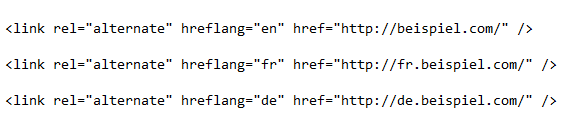
Fig. 4: hreflang markup on a URL with three different language variants
It is also recommended to mark up content for users who speak the same language but come from different regions. In this example, specific URLs are provided for German-speaking users from Austria and Switzerland. All other German-speaking users are shown the general German page.

Fig. 5: Language markups for users with the same language from different regions
If you offer the option on your website to choose between different languages or countries, or if users are automatically redirected based on their language, be sure to keep the "x-default" hreflang value in mind. This is treated as the default page for any language versions that are not explicitly specified. Typically, this is the English-language version.

Fig. 6: x-default hreflang attribute of a multilingual page
Which language values are supported?
The hreflang tag defines the language version of a URL that offers multilingual content on a website. The language and region are defined using different ISO formats. For example:
de: German content, no specific region
de-AU: German content, Austria
de-CH: German content, Switzerland
What are the most common mistakes when using hreflang tags?
Hreflang is a very useful attribute. However, mistakes are often made during implementation. Here are the most common errors and misconceptions:
No hreflang tag is used despite having multiple languages
Many website owners shy away from tackling this topic because it seems quite complex at first glance. However, it's well worth the investment of time to show Google—using correctly implemented hreflang tags—that multilingual content exists and where it can be found. Your visitors will also appreciate being shown the right content in search results.
You're using hreflang tags, but not setting an x-default
As described above, "x-default" tells Google which content should be displayed to users who don't have a matching language version. Without using this value, users might see the wrong language variants in search results or be redirected to the wrong version.
Google Search Console and the hreflang tag contradict each other
If you use Google Search Console, you can set the language variant of a domain or directory under "Search Traffic" → "International Targeting."
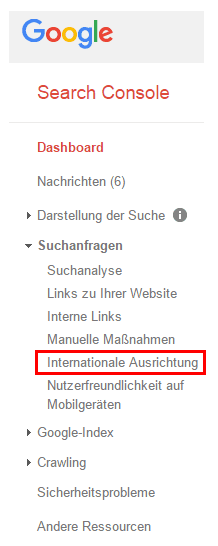
Fig. 7: Google Search Console "International Targeting" for a website or directory
Google automatically assigns country-specific top-level domains (.de, .fr, .es), while you have a free choice with generic top-level domains (.com, .org, .net). Make sure your settings in Search Console do not differ from the hreflang tags implemented on your site, but rather send identical signals.
Missing return tags (confirmation links)
A simple yet common mistake involves cross-linking. Imagine Page 1 (de) links to Page 2 (fr). Page 2 must then also link back to Page 1. If this return link is missing, the hreflang tags may not be interpreted correctly and could even be ignored. As a result, the correct language version might not appear in search results.
Canonical tag and hreflang tag don't match
It is important to send clear signals to Google. This is the only way to minimize the risk of Google ignoring instructions and deciding for itself what is relevant for the user. This also applies to using hreflang tags together with canonical tags. If a URL points to itself with an hreflang tag, you must avoid having the canonical tag point to a different URL; otherwise, Google won't know which instruction to follow. If you have identical content across different URLs, make sure to specify the URL you want indexed in the canonical tag. And only that URL should be marked up with the hreflang tag. This ensures that both tags are consistent.
How can we help?
Do you have a website with content in multiple languages and aren't sure if your hreflang tags are implemented correctly? Or would you like to know if there's duplicate content on your site? Contact us and we'll be happy to help. Of course, we're also here to advise you across all other areas of online marketing. We look forward to hearing from you!
Nadine
Wolff
As a long-time expert in SEO (and web analytics), Nadine Wolff has been working with internetwarriors since 2015. She leads the SEO & Web Analytics team and is passionate about all the (sometimes quirky) innovations from Google and the other major search engines. In the SEO field, Nadine has published articles in Website Boosting and looks forward to professional workshops and sustainable organic exchanges.
