

Blog Post
Search Engine Optimization

Nadine
Wolff
published on:
Identify and Properly Analyze AI Traffic in Google Analytics
Table of Contents
Since Large Language Models (LLMs for short) have become part of everyday life and users increasingly use AI tools like ChatGPT, Gemini, Claude, or Perplexity, a completely new traffic source has emerged.
For website owners and marketing managers, the question is increasingly becoming how many users actually reach their website via links and recommendations from these LLMs and how large the share of this AI-generated traffic is in overall visitor volume.
This traffic, let’s call it “AI Traffic,” is not automatically shown in Google Analytics. In this article, I’ll show you how to find, measure, and evaluate AI Traffic in GA4. At the same time, you’ll learn what conclusions you can draw from it for your planning and why AI visibility will be just as relevant in the future as classic search engine rankings.
What exactly is AI Traffic and how is it composed?
The term AI Traffic refers to all website visits that originate from AI systems and generative search engines.
Here are some examples of where the traffic could come from:
Traffic from ChatGPT/GPT Search
Traffic from Perplexity
Traffic from AI-integrated browsers (e.g., Microsoft Edge with the integrated Copilot)
Copied links that users click from AI responses
AI Traffic can be generated actively by users when they click links in an AI response. In addition, there is passive traffic when AI systems crawl pages to process content for their models.
Recognizing AI Traffic in GA4: The Most Important Methods
1. Recognize referrers (e.g., ChatGPT traffic)
When a user clicks a link from an AI response, the browser automatically sends a so-called referrer. This information indicates which page the user is coming from. In GA4, this appears in the “newly generated traffic” tab as “Referral,” for example with the source perplexity or claude.
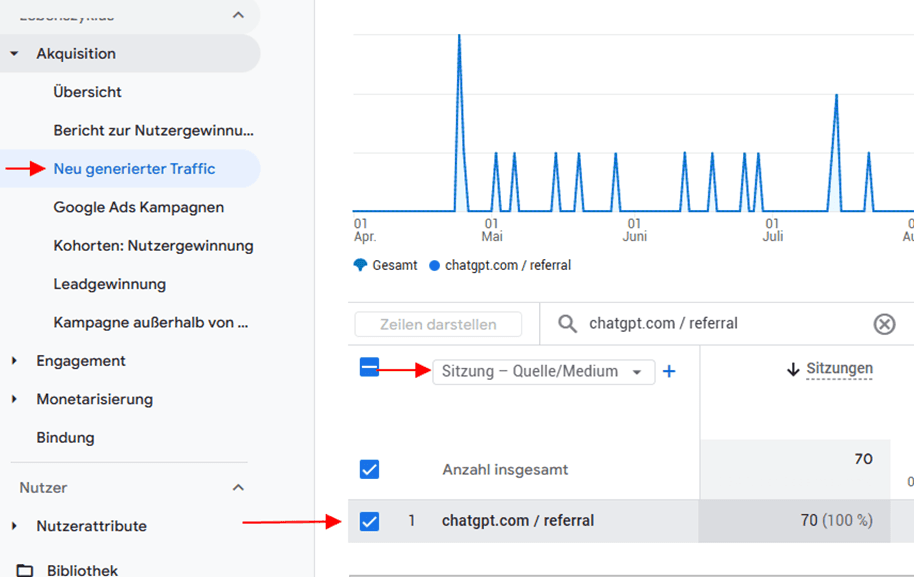
Figure 1: AI traffic via a referrer
2. UTM tracking
For some time now, ChatGPT has automatically appended “?utm_source=chatgpt.com” to links it outputs in responses. This means that this AI Traffic appears in Google Analytics not as a referral, but as its own source with UTM tagging - and is therefore easier and cleaner to identify than plain referral traffic.
Perplexity or other AI systems do not necessarily do this. This traffic is often only identifiable via the referrer.
AI Traffic in GA4 - Make exploratory data analysis visible
Exploratory data analysis in GA4 offers the most flexible way to evaluate AI Traffic in a targeted manner. Unlike in standard reports, you can freely combine your own dimensions, filters, and segments here.
To do this, create a new empty data exploration and add a dimension and, if desired, one or more metrics:
Dimension --> Session – Source/Medium
Metrics --> Sessions
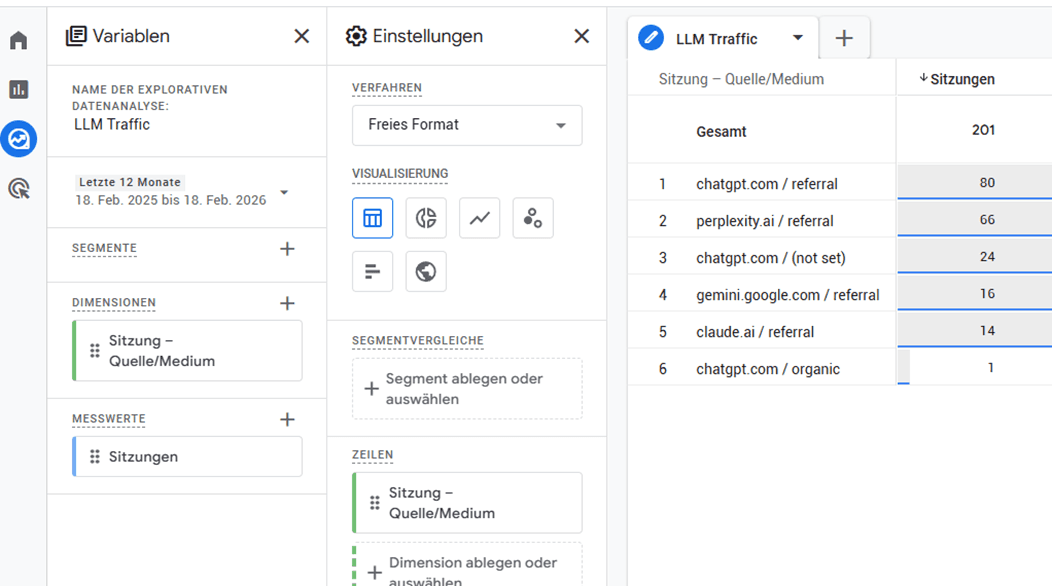
Figure 2: Exploratory data analysis
To see only traffic from AI platforms, now create a filter using a regular expression (regex). This filter ensures that only sessions are shown whose source is one of the AI platforms mentioned.
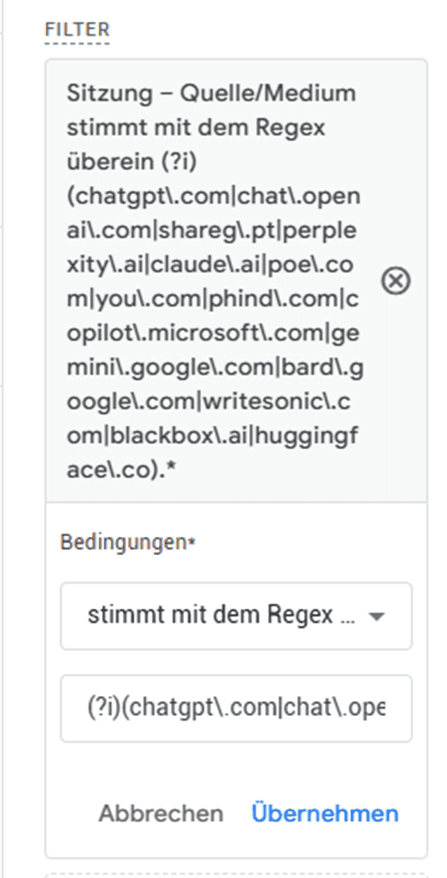
Figure 3: Example of a regex that filters the various AI systems
The result shows you - as in the example above - a detailed table by source and medium. One thing stands out: ChatGPT appears in two variants, once as “chatgpt.com / referral” and once with UTM tagging as “chatgpt.com / (not set).” This is because ChatGPT does not consistently append the UTM parameter to every link. It is therefore recommended to evaluate both entries together.
What you see in GA4 - and what it means
Once you have isolated AI Traffic in GA4, you essentially have three different metrics available:
Size & development: How many sessions are generated via AI platforms? How does this develop over time? A growing value shows that your content is increasingly being recommended by LLMs as a source. This in turn is a direct signal of your AI visibility.
Links: Which pages are being linked? Which of your subpages appear as landing pages? This metric shows you which content LLMs consider relevant enough to recommend. These are your strongest pieces of content in an AI context.
User behavior: Time on site, bounce rate, and engagement rate of AI Traffic compared with other channels provide insight into whether the linked content matches users’ expectations. High bounce rates, on the other hand, can mean that the linked page does not deliver what the AI response promised.
What you can infer from AI Traffic in GA4
The landing pages (with the AI Traffic) are your direct feedback on which content LLMs consider worth citing. Look at what these pages have in common: Are they more explanatory how-to articles? Detailed guides? Definitions? These patterns show you which content format LLMs prefer - and you can use that specifically for new content!
Identify content gaps
Get an overview of which topics your AI Traffic is coming from and compare them with your overall content offering. Are there topic areas where you get traffic but only have a few or thin pieces of content? These are your content gaps - areas where LLMs already see you as a relevant source, but you still aren’t fully realizing the potential.
Optimize content specifically for LLMs (GEO)
Generative Engine Optimization, or GEO for short, is the counterpart to classic SEO - but for AI systems. Specifically, the goal is to structure content so that LLMs can easily process and cite it. This includes clear, concise answers to specific questions, well-structured sections with clear headings, and trustworthy, source-based language. Pages that already receive AI Traffic are your best starting point - they are clearly already working, and targeted optimization can further increase their visibility in LLM responses.
Conclusion: AI Traffic will become a strategic success factor
Recognizing AI Traffic in GA4 is possible, but only with the right methods. Anyone who understands AI visibility and tracks it cleanly gains valuable insights into the relevance and future viability of their content. For companies, this means a new responsibility in content creation and technical optimization.
If you need support with tracking, SEO/GEO, or AI content strategy, feel free to get in touch with us. Our team will help you make AI visibility measurable and align your measures based on data. Contact us now!
FAQ
What is the difference between AI Traffic and Bot Traffic?
Bot traffic comes from classic crawlers, while AI Traffic results from AI systems and real users in AI interfaces.
Is AI Traffic automatically marked in GA4?
Not completely. Some systems are recognized, but much of it still has to be filtered out via segments or referrers.
Which AI platforms should I track in GA4?
The most important sources today are ChatGPT, Perplexity, Claude, Gemini, and Microsoft Copilot. ChatGPT is usually the largest source because it automatically sets UTM parameters and is therefore the easiest to identify in GA4.
Is it worth analyzing AI Traffic if the volume is still low?
Clear answer: Yes! Anyone who starts measuring and understanding AI Traffic now builds an advantage before this channel becomes the standard for the industry. Similar to SEO in the early 2000s, the same applies here: those who get in early benefit in the long run.
Nadine
Wolff
As a long-time expert in SEO (and web analytics), Nadine Wolff has been working with internetwarriors since 2015. She leads the SEO & Web Analytics team and is passionate about all the (sometimes quirky) innovations from Google and the other major search engines. In the SEO field, Nadine has published articles in Website Boosting and looks forward to professional workshops and sustainable organic exchanges.
Comments on the post
no comments yet
Write a comment
Your email address will not be published. Required fields are marked with *
