


Blog Post
Search Engine Advertising (SEA)

Nadine
Wolff
published on:
Google Ads for Small Businesses – How to Achieve Maximum Efficiency in Online Marketing with Minimal Google Ads Costs
Table of Contents

We often see smaller businesses give Google Ads (formerly Google AdWords) a try, only to quickly abandon it as ineffective: "We just burned money there, and it didn't bring us anything!" That's a bitter realization, especially when working with a limited Google Ads budget. But why does Google Ads seemingly fail when it comes to online marketing for SMBs?
Our experience shows that Google Ads isn't just for large corporations with five-figure budgets; it can also be the perfect marketing channel for small and medium-sized businesses. To make paid Google results truly profitable, however, there are key steps and configurations you need to follow—details that can quickly leave beginners feeling overwhelmed and ready to give up.
To help you out, we've put together the most common mistakes and biggest challenges we encounter in day-to-day practice.
Getting Started on the Right Foot with a Solid Foundation
If you don't have experience managing Google Ads yet, some trial and error is almost inevitable. But taking that route can quickly get expensive: the feeling of simply burning through money without seeing any return usually ends in frustration.
To avoid high Google AdWords costs (now Google Ads), a well-thought-out account structure makes all the difference. Here are several typical mistakes we regularly see in practice.
Overall account & campaign structure: The first mistake often starts right with the campaign structure. Frequently, only a single campaign with one ad group is created, and all keywords are dumped into it. A setup like this practically guarantees an ineffective account and high Google Ads costs. Sure, such an unfavorable structure will still get clicks on the ads, but they tend to be very generic and significantly more expensive than necessary for the vast majority of keywords.
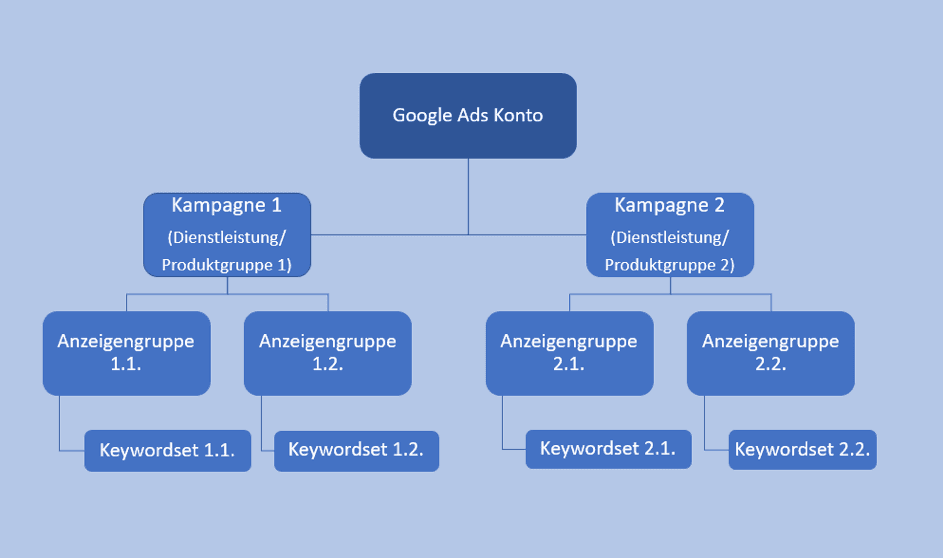
Fig. 1: Example of a well-structured account and campaign setup
Higher relevance through segmentation: Trying to pack many different keywords, synonyms, and related terms into a single ad group hurts your overall relevance. To serve the most relevant ad possible and increase the chances of users clicking on it, your ad copy needs to be as closely matched to the searched keyword as possible. This means it really pays off to create a larger number of ad groups with targeted ads whose messaging and wording are carefully optimized for your target audience and specific search queries.
Conversion tracking: Missing or improperly implemented conversion tracking makes a meaningful account analysis impossible. It leaves you in the dark about whether—and how much—money your ads are actually generating, or which campaigns, ad groups, and keywords are performing well. Alongside a working tracking setup, your Google Ads account should also be properly linked to Google Analytics.
Budget limitations: An ad budget that's set too low can mean your ads stop showing for half the day simply because the daily budget has run out. Optimizing for the highest possible ad position isn't always the smartest move, especially when you need to keep your Google Ads costs in check. Lower bids might place your ad in a slightly lower position, but it can stay active throughout the entire day and ultimately bring in more clicks.
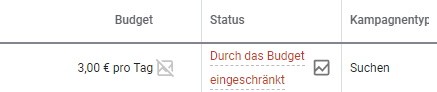
Fig. 2: A limited budget can prevent ads from showing and hold back performance.
The right set of keywords: It's a misconception that campaign success depends on the sheer volume of keywords you target. In fact, quite the opposite is true: with a limited ad budget, it's essential to select targeted keywords using the Keyword Planner and focus your resources on the terms that are most relevant and promise the greatest success.
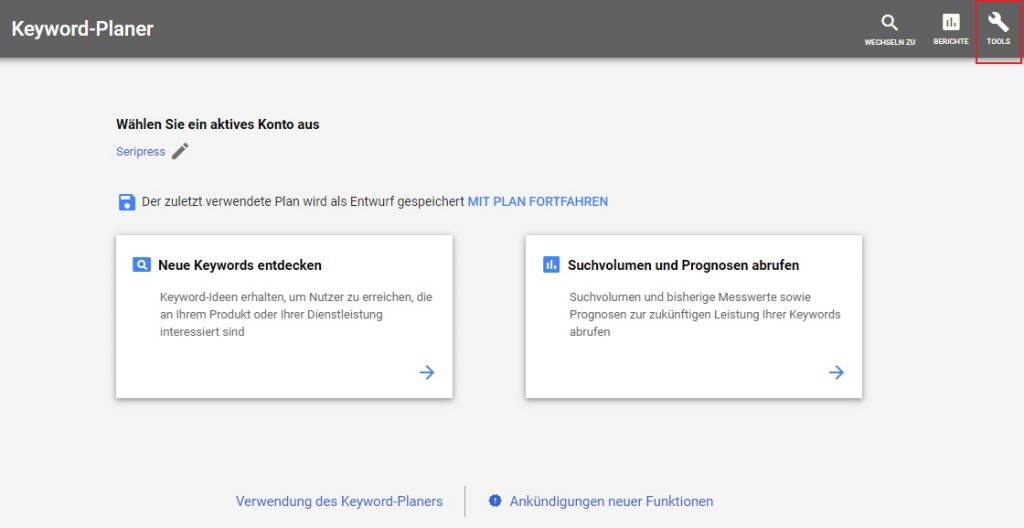
Fig. 3: You can discover relevant keywords using the Keyword Planner in Google Ads.
It's also crucial to make sure that multiple ad groups aren't bidding on the same keywords and competing against each other. Each keyword should only be included in a single ad group. Negative keywords help prevent unwanted matching across different ad groups. Other practical limits include local targeting or specifically serving ads on certain devices (desktop, mobile) or locations.
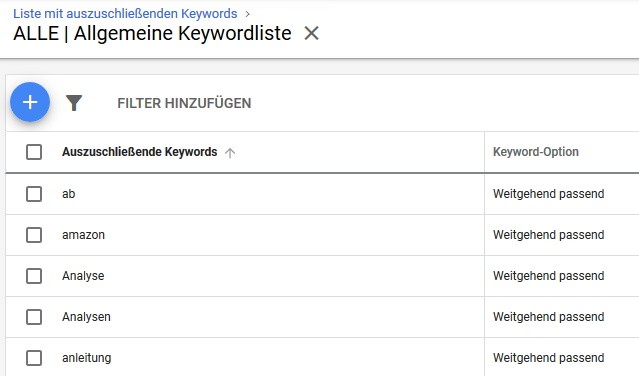
Fig. 4: Targeted search queries using negative keyword lists
Keyword match types: By default, keywords in Google Ads are set to "broad match." However, this means you're bidding on an almost uncontrollable variety of search terms, including synonyms, related topics, and similar variations. As a result, your ads are triggered by queries that are only marginally relevant, making it very difficult to attract high-quality traffic. Broad match should therefore only be used with modifiers ("+"), or you can opt for match types like "Phrase match" or "Exact match" instead.
Ad copy: Writing effective ad copy can be tough if you're not used to it. The tight character limits and specific formats present a real challenge. When crafting your ads, make sure to take advantage of expanded text ads, Responsive Search Ads (RSAs), and the full range of ad features—meaning you should use all headlines (H1–H3) and both description lines. Unique Selling Propositions (USPs) and calls to action should always find a place, either in the ad description or in the headline (H3). Unlike everyday speech, complete sentences are usually not the way to go here. And even when following best practices, the golden rule remains: test, test, test until you've found your best-performing ad copy.

Fig. 5: Example of Google Ads ad copy
Changes without a statistical basis: Account optimizations and adjustments are essential for Google Ads success, but they should always be backed by sufficient data. Making daily tweaks without waiting for a reliable number of clicks and impressions is counterproductive and can hurt your account's performance even further.
Challenges for Small Businesses with a Limited Budget
Beyond the specific mistakes made by many Google Ads beginners, there are unique challenges that especially affect small businesses with tight budgets. These include:
Defining clear goals: Running Google Ads just for the sake of it is one of the quickest paths to disappointment. You should clarify your campaign goals right from the start: Are you looking to generate traffic? Is it about leads or sales, brand awareness, overall visibility, or competing directly with market rivals? These goals heavily dictate which keywords you target, how you write your ads, and which landing pages you choose. That's why setting clear goals should always be step number one.
Unrealistic expectations: Inexperienced advertisers often expect to see immediate results from their campaigns. While you will naturally start seeing clicks as soon as your keywords and ads go live, they often don't translate into purchases or a positive return on investment (ROI) right away. Even Google Ads pros can't promise instant success—every account needs time to be fine-tuned. The nuances of a custom cost-per-click strategy in particular can be tough for non-experts to wrap their heads around. The best approach is to either have a pro explain what is being targeted and why, or simply trust the experience of your agency or specialist.
A competitive landscape: Running Google Ads simply isn't effortless, even if Google likes to make it sound that way at times. And it's not getting any easier: stiffer competition, diverse strategies, and rising click prices can make life tricky for advertisers.
Lack of time: Teams with just a few employees rarely have the bandwidth to dedicate the resources needed to set up and fine-tune an effective Google Ads account. Outsourcing can be a great alternative here, though it still helps to have a solid basic understanding yourself.
Inactivity: A shortage of time often leads to an inactive account. Regular check-ins get skipped, performance isn't analyzed, and optimization tasks—like adding negative keywords—fall by the wayside, driving up your Google Ads costs. Some small businesses don't even log in once a month, even though checking in at least once a week is a good idea to keep tabs on performance, even for a well-structured account.
Google Ads Smart campaigns (formerly Express): With Google Ads Smart campaigns, Google promises small and inexperienced businesses an easy, largely automated way to manage their advertising. Advertisers don't have to do much more than define their audience and budget; Google takes care of choosing keywords, placements, and bids. It sounds tempting, but there's a catch: handing over optimization like this means losing control over your budget distribution, targeted reach, and manual tweaks—which, in our experience, are far more effective and budget-friendly.
Save on Costs with the Right Settings
To keep your Google Ads costs in check, getting your account and campaign settings right is essential. Here are a few key areas:
Display Network opt-in for Search campaigns: This is a mistake that often happens simply by accident: when setting up Search campaigns, the Display Network is selected as an opt-in in the settings. This setting makes evaluating your campaigns quite tricky and usually leads to a drop in performance. That's why you'll want to disable the Display Network across all your Search campaigns.
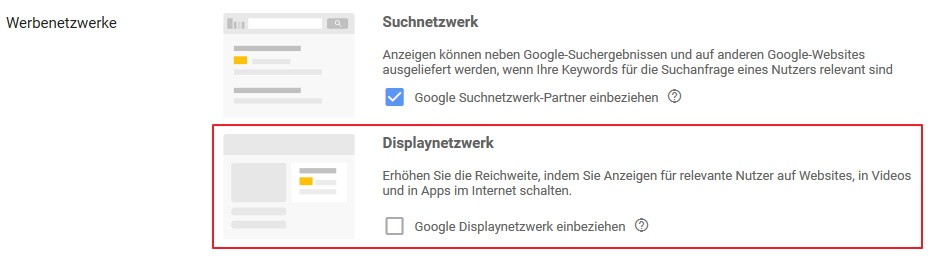
Fig. 6: The right settings for Google Ads Search campaigns[/caption]
Ad scheduling and locations: To reach your audience at the right time and in the right place, you should set up an ad schedule along with targeted location settings for your campaigns. These settings help you capture more relevant searches while keeping your Google Ads spend under control. Make sure to base these choices on real data.
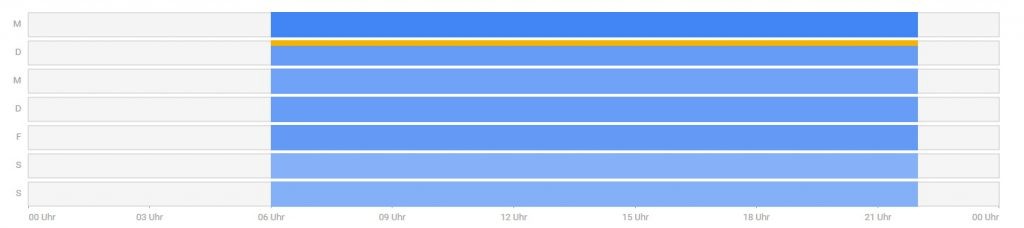
Fig. 7: Keeping Google Ads costs under control with ad scheduling
Incorrect attribution: Alongside tracking issues, conversion attribution is also frequently misconfigured. All too often, we still see "Last Click" being used instead of "Position-based," "Data-driven," "Linear," or "Time decay." Using the wrong attribution model keeps you from seeing the bigger picture across your account, putting you at risk of missing out on allocating your budget to the ads that truly drive value.
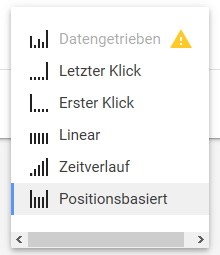
Fig. 8: Putting your Google Ads budget to smart use with the right attribution model
Opportunities for Small and Local Businesses
After going through all those hurdles and challenges, it's time for some optimism: online marketing for SMBs through Google Ads doesn't just come with obstacles—it brings plenty of great opportunities, too. Here's a quick look at a few of them:
A lower bar to clear: Especially in certain industries, you can achieve fantastic results with straightforward methods and a smart strategy, simply because many competitors run their Google Ads with the exact mistakes and issues mentioned above. The bar for doing better often isn't as high as the search results might lead you to believe. By purposefully improving your keywords' Quality Scores, you can boost campaign efficiency without necessarily having to pay higher click prices.
Remarketing: Reaching out specifically to users who have already visited your site can significantly increase your campaign success, even on a modest budget. Other smart tactics include excluding returning users who have already seen an ad or showing tailored ads specifically designed for them. You can find more on the topic of remarketing here.
Local targeting: For local brick-and-mortar shops and service providers in particular, it's vital not to blow your budget on nationwide ad delivery. Instead, keep your visibility focused strictly on your regional target audience. You can easily manage this using location settings in your campaigns or through local ads.
Professional keyword research: With the help of the Google Ads Keyword Planner, your own analytics data, or other keyword tools, you can pinpoint specific keywords to target intentionally, ensuring your budget is spent on the most relevant traffic. The better your ad matches the user's search query and the more accurately it reflects the offer on your landing page, the higher your chances of turning that click into a real lead or sale.
Bottom Line: Making Google Ads Work for You on a Modest Budget
Google Ads definitely isn't reserved for huge corporations with massive marketing budgets. Small businesses can also use this channel effectively to boost their visibility, build brand awareness, drive traffic, and grow sales. The key ingredients are targeted reach, ongoing monitoring and optimization of your account, and a little patience while the results roll in.
Don't have the time or internal bandwidth to dive deep into Google Ads yourself, and prefer having a pro set up and optimize your account? We'd love to help you out.
We look forward to hearing from you!
Nadine
Wolff
As a long-time expert in SEO (and web analytics), Nadine Wolff has been working with internetwarriors since 2015. She leads the SEO & Web Analytics team and is passionate about all the (sometimes quirky) innovations from Google and the other major search engines. In the SEO field, Nadine has published articles in Website Boosting and looks forward to professional workshops and sustainable organic exchanges.
