


Blog Post
Search Engine Optimization

Julien
Moritz
published on:

Paid landing pages – what should you pay attention to? Tips, tricks, etc.
Table of Contents
The German Accessibility Strengthening Act (BFSG), scheduled for 2025, marks a significant step forward in developing an inclusive digital society. It aims to improve the accessibility of digital products and services for people with disabilities. This law builds upon existing legal frameworks for accessibility and expands them to meet the demands of the digital age.
Good enough reason to check if your website meets the requirements! In this article, you'll learn how to use the WAVE and Lighthouse tools to spot areas that need work, see what actions are required, and get a solid sense of what optimizing your site to WCAG AA criteria really looks like.
Why the WCAG Guidelines Matter
A key aspect of this law is compliance with the Web Content Accessibility Guidelines (WCAG), developed by the World Wide Web Consortium (W3C). The WCAG serve as an internationally recognized standard for web content accessibility and are divided into three levels of conformance: A, AA, and AAA. These guidelines provide detailed recommendations on how digital content should be designed to make it accessible to people with a wide range of disabilities, including visual, hearing, motor, and cognitive impairments.
The law is expected to include requirements ensuring that websites, mobile apps, and other digital technologies comply with WCAG standards. This means that developers and providers of digital products and services must design their offerings so that everyone can access them, regardless of their physical or sensory abilities. Key elements of WCAG include ensuring keyboard navigability, providing alternative text for visual content, improving the usability and readability of content, and ensuring compatibility with assistive technologies.
The Accessibility Strengthening Act will have far-reaching impacts on the public sector as well as companies offering digital products and services in the German market. Implementing WCAG compliance won't just promote digital inclusion—it will also improve the overall quality and accessibility of online offerings.
Measuring Accessibility with Google Lighthouse
Lighthouse is an open-source tool developed by Google to improve the quality of websites. It is a valuable resource for both developers and website owners looking to analyze and optimize performance, accessibility, web application best practices, and search engine optimization (SEO).
Accessibility and SEO share synergies that shouldn't be underestimated, especially if your optimization also aims to boost organic visibility alongside accessibility. You can find a whitepaper with helpful checklists right here with us.
Below, we'll explain how to install Lighthouse, how it works, and how to measure accessibility with it.
Lighthouse can be installed and used in several ways:
Lighthouse can be installed as an extension in the Google Chrome browser. Simply visit the Chrome Web Store, search for Lighthouse, and add it.
Lighthouse is also built directly into Chrome DevTools. To use it, simply open DevTools in Chrome, navigate to the "Lighthouse" tab, and run the audit.
The PageSpeed Insights website also evaluates accessibility.
Lighthouse runs a series of tests to evaluate different aspects of a website. The results are compiled into a report that not only displays the page's performance score, but also offers specific recommendations for improvement. The report is divided into several categories:

Categories measured in Lighthouse
Evaluating Accessibility with the Lighthouse Tool
Lighthouse evaluates accessibility through a mix of automated tests and recommendations for manual checks. These tests include:
Contrast ratios: Checking text contrast against the background.
Keyboard navigation: Ensuring all interactive elements on the page can be reached and used with a keyboard.
ARIA attributes: Using ARIA (Accessible Rich Internet Applications) attributes to improve accessibility for screen readers and other assistive technologies.
HTML structural elements: Using proper HTML elements to structure content and navigation.
Classic SEO basics, such as heading hierarchy, ALT attributes, or [lang] declarations.
It's important to remember that, despite Lighthouse's comprehensive tests, a fully accessible website cannot be guaranteed by automated audits alone. The manual review recommendations provided by Lighthouse are a crucial step toward achieving complete accessibility.
In Google's Developer Tools, an evaluation hierarchy is published where individual factors carry a weight from 1 to 10.
It's a smart move to focus first on the actions with higher weighting—interestingly, these factors are also closely tied to SEO best practices.
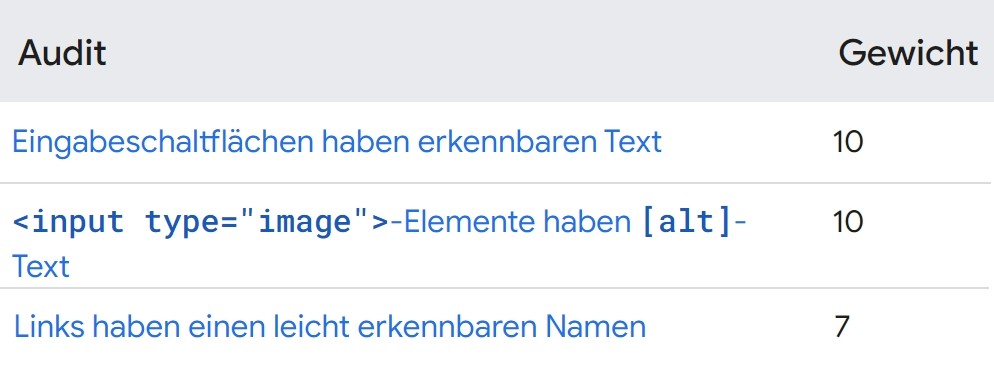
Excerpt of individual metrics and weightings
Google's Lighthouse tool displays individual accessibility issues on your website, organized by topic. They are shown in an accordion format, keeping everything clear and easy to navigate—see 1.
Lighthouse also gives users the option to view more information about each error. In this example, it not only shows what an image's ALT attribute should look like, but also how to best implement it in the source code so it can be read by search engines and assistive technologies like screen readers—see 2.
In the final section, the specific elements where the issue occurs are highlighted, complete with a screenshot and a snippet of the code. Unfortunately, the screenshots displayed by Lighthouse can be quite blurry, making it a bit tricky at first glance to pinpoint the element's location on the full page—see 3.
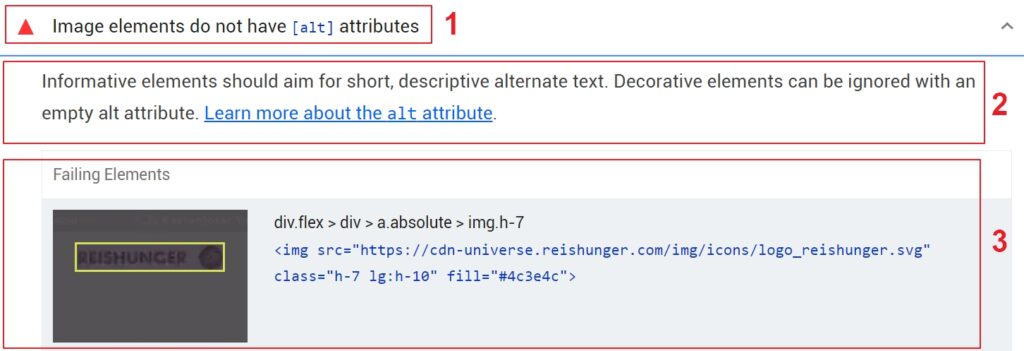
Display of issues in Google Lighthouse
In summary, Lighthouse is a powerful tool that helps web developers and site owners analyze and optimize their web presence. Thanks to its versatile installation options, detailed reports, and actionable recommendations, Lighthouse plays an important role in modern web development—and its metrics are especially valuable for SEO. While Google hasn't explicitly stated that accessibility is a direct ranking factor yet, many related metrics are already factored in indirectly. Accessible websites are becoming increasingly vital, so it's likely only a matter of time before these indicators and measurements make their way into Google Search Console as well.
WAVE – A Tool with Visual Accessibility Markers
You can also check your website for accessibility easily and for free using the WAVE tool. Unlike Lighthouse, it wasn't developed directly by Google. Lighthouse has the advantage of pulling data straight from Google, which might make it a stronger indicator for search rankings. However, WAVE was created by the renowned organization WebAIM and also follows the WCAG guidelines closely. Because of this, the results between both tools shouldn't differ significantly when auditing for accessibility. What stands out to us with WAVE is its clear presentation of results and user-friendly interface. A paid option is also available: the WAVE API is installed locally and can audit your entire website. In this article, we're focusing on the free version and won't be diving further into the WAVE API.
WAVE makes web content accessible quickly and efficiently, available both as an online tool and as a handy browser extension for Chrome and Firefox. When using it, you remain directly on your live site (see Figure 4). The tool highlights accessibility tips and errors using small icons right on the page. This instant visual feedback makes it easy to spot and tackle problems right away. WAVE pays special attention to critical accessibility elements—from alt attributes and form labels to contrast issues. It also checks whether your page has a clean structure. Additionally, WAVE flags ambiguous or non-descriptive links and reviews ARIA labels, which help ensure screen reader users enjoy an optimal web experience.
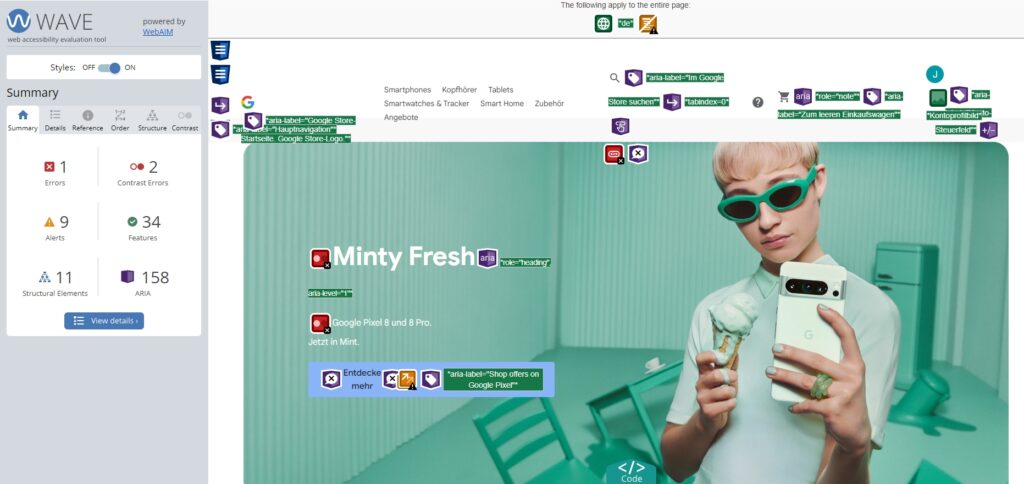
Using the WAVE tool on the Google Store
Identifying Errors
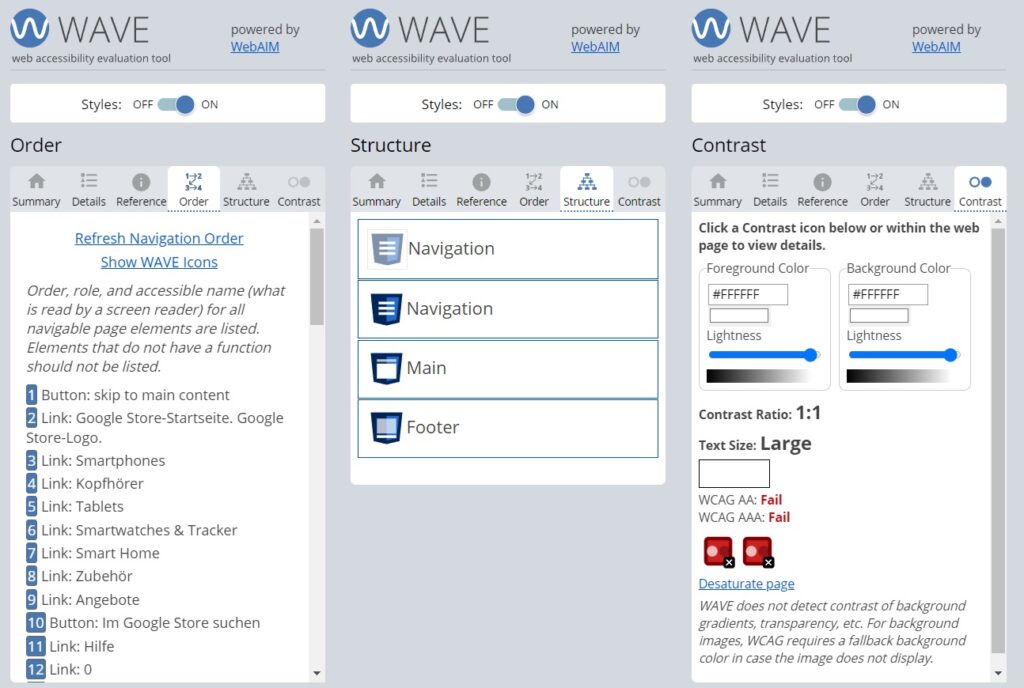
On the left side of the screen, you'll find a dashboard used for navigation and reviewing accessibility elements. The menu features six distinct sections and is very intuitive. Along with a summary showing the count of errors, contrast errors, alerts, features, structural elements, and ARIA usage, you'll find everything detailed under the "Details" tab. With just one click, you can jump straight to the source on the page. Under "Reference," you'll find an in-depth explanation of the issue and tips on how to fix it (see Figure 5).
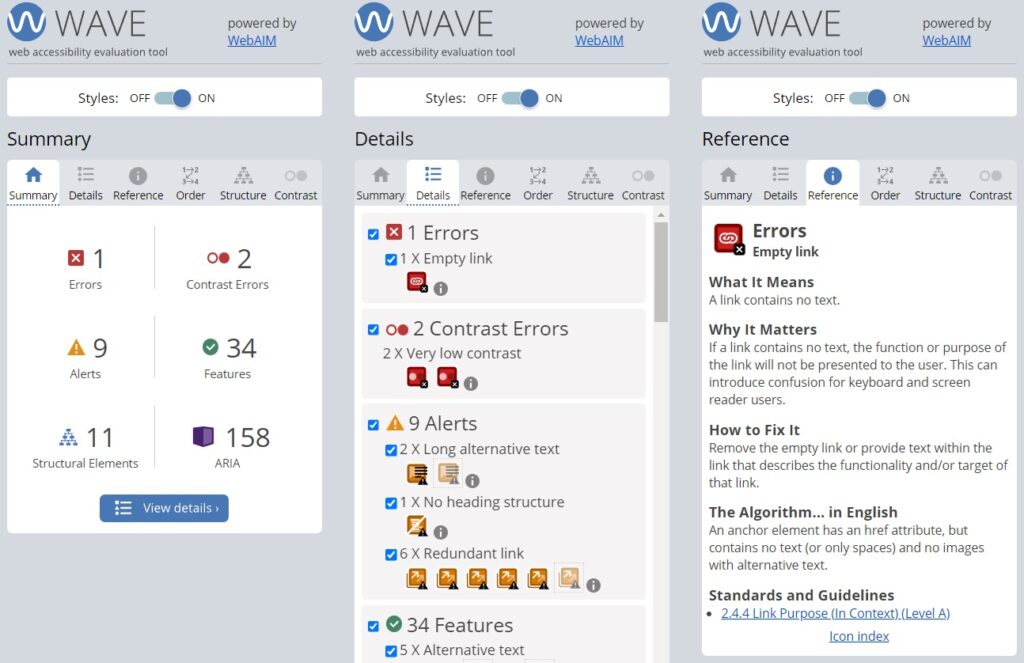
WAVE tool dashboard (Sections 1–3)
On top of that, you can disable styles or jump directly to the relevant spot in the HTML code. This makes it easy for the WAVE tool to help you track down and resolve every issue.
This accessibility audit tool also displays the tab order (navigating through all interactive elements—links and form fields—using the Tab key). It provides an overview of your heading hierarchy and allows you to check color contrasts manually (see Figure 6). This is particularly useful for checking contrast on important images, which WAVE doesn't inspect automatically. In cases where text is embedded directly within an image, it's essential that everyone can read it comfortably.
Interpreting the Results
Errors and contrast issues are usually clear violations of WCAG Level AA guidelines and should be resolved before the Accessibility Strengthening Act takes effect. With alerts, the WAVE tool highlights potential usability barriers that aren't quite as severe and don't always stem from legal requirements. Still, it's best practice to review all findings with a critical eye before jumping into implementation.
When it comes to features and ARIA labels, these are HTML elements designed to make websites more accessible—provided they're used correctly. For example, an existing alt attribute on an image is flagged as a feature. However, WAVE can't judge the quality or context of that text. Alt attributes should accurately describe the image's content since screen readers read them aloud, so you'll need to check for yourself whether they make sense. ARIA labels are another great example where proper usage is key. WAVE highlights all labels in use, but if applied incorrectly, they can actually create more hurdles for users. To verify whether they work as intended, testing your site with a screen reader is extremely helpful. For Windows users, we recommend the free, easy-to-use screen reader NVDA. Apple devices come with "VoiceOver" already built in.
The tab order should follow a logical sequence of links, typically reading visually from left to right and top to bottom. If it doesn't, the code will need a quick tune-up.
Conclusion: Lighthouse vs. WAVE
The benefits of accessibility speak for themselves. It's a fantastic opportunity for website owners to improve usability and make content available to everyone. At the same time, your visibility stands to gain from an accessible build.
So, which tool is best for checking your website's accessibility? In this post, we've highlighted two of our favorites: Lighthouse and WAVE. Both can be run as browser extensions or directly via their websites. Lighthouse is a Google-backed tool, meaning its insights might soon influence search rankings directly—making its recommendations a solid choice from an SEO perspective. When it comes to how results are presented, WAVE clearly takes the lead in our book. Issues and suggestions are marked right on the page itself. From a built-in contrast checker and structure viewer to the ability to toggle styles off, WAVE offers versatile options while remaining clean and easy to navigate. In our experience, both tools uncover very similar errors and warnings.
That said, remember that these are automated tools. Truly evaluating and understanding accessibility barriers requires human judgment. We always recommend pairing automated scans with screen reader tests to get an authentic picture of your site's accessibility. Keep in mind, too, that these tools audit individual pages rather than your entire site, which means issues arising from cross-page interactions might be missed.
Need a hand auditing and implementing accessibility on your website? The warriors team from Berlin is here to help. Starting June 28, 2025, all covered websites must be fully accessible. Get ahead of the curve now and stand out from the competition! Feel free to get in touch with us anytime for a no-obligation quote.
Julien
Moritz
Since October 2023, Julien Moritz has been bringing fresh energy to the internetwarriors' SEO team. With his strong interest in online marketing and passion for SEO strategies, he helps businesses enhance their digital presence. His determined and solution-oriented approach enables internetwarriors' clients to achieve their goals.
Comments on the post
no comments yet
Write a comment
Your email address will not be published. Required fields are marked with *
